Every iPhone battery will eventually degrade. But understanding why this happens and how to slow the process can add years to your battery's useful life. This guide explains the science behind battery degradation and provides actionable tips for prevention.
How Lithium-Ion Batteries Work
Your iPhone uses a lithium-ion battery, which stores energy by moving lithium ions between two electrodes:
- Charging: Ions move from cathode to anode
- Discharging: Ions move from anode back to cathode
- Each cycle: Causes tiny amounts of physical wear
This movement happens millions of times over your battery's life, and each time causes microscopic damage to the electrode materials.
Why Batteries Degrade
Battery degradation happens due to several factors:
1. Cycle Aging
Every charge cycle causes wear. Apple designs iPhone batteries to retain 80% capacity after:
- 500 cycles (iPhone 14 and earlier)
- 1,000 cycles (iPhone 15 and later)
2. Calendar Aging
Batteries degrade over time even when not used. Chemical reactions continue slowly regardless of usage.
3. Heat Damage
High temperatures accelerate chemical degradation. This is why:
- Hot car interiors damage batteries
- Heavy use while charging creates heat
- Fast charging generates more heat than slow charging
4. High and Low Voltage Stress
Keeping a battery at very high (100%) or very low (0%) charge for extended periods causes additional stress on the cell chemistry.
Degradation Timeline
Here is what to expect at different stages of battery life:
| Time Period | Typical Health | What Happens |
|---|---|---|
| 0-6 months | 99-100% | Minimal degradation, like-new performance |
| 6-12 months | 95-99% | Slight capacity loss, unnoticeable to most |
| 1-2 years | 88-95% | Gradual decline, may notice shorter days |
| 2-3 years | 80-88% | Noticeable capacity loss, more frequent charging |
| 3+ years | Below 80% | Consider replacement for normal use |
Predict Your Battery's Future
Battery Health Pro uses your actual charging data to forecast how your battery will degrade over time. The Degradation Forecast feature shows predictions for:
- 3 months: Short-term outlook based on current habits
- 6 months: Medium-term projection
- 12 months: Long-term forecast for planning
This helps you plan for battery replacement and identify habits that accelerate wear.
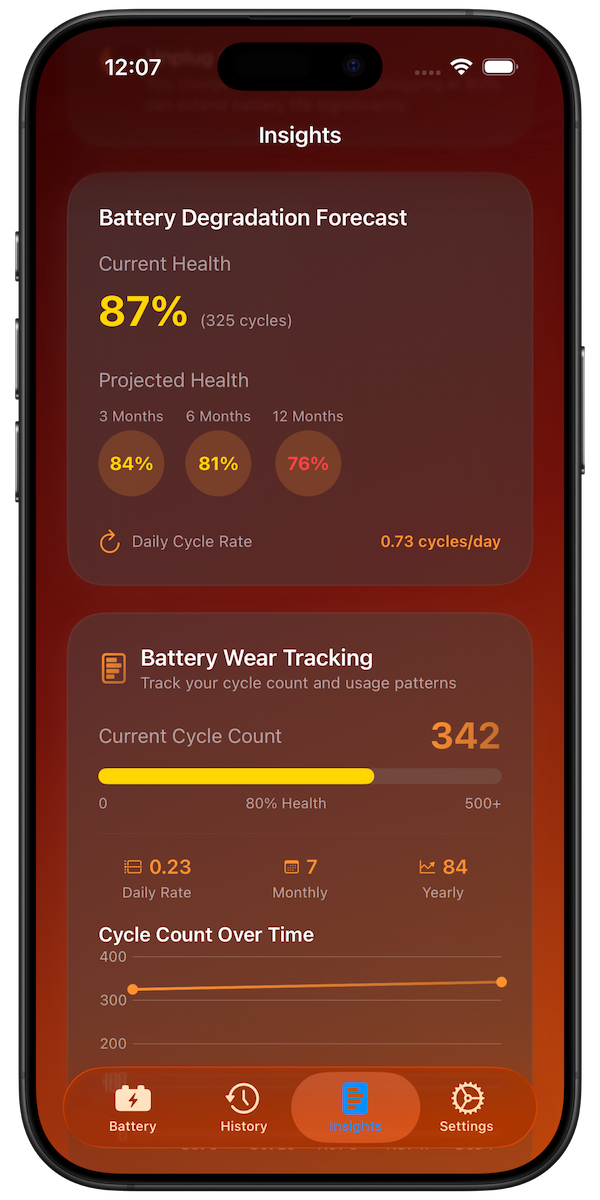
Degradation Forecast predicts your battery health over 3, 6, and 12 months
How to Slow Battery Degradation
Temperature Management
- Keep iPhone between 16-22°C (62-72°F) when possible
- Remove case while charging if phone gets warm
- Avoid leaving in hot cars or direct sunlight
- Do not use phone extensively while charging
Charging Best Practices
- Enable Optimized Battery Charging (Settings > Battery > Battery Health)
- Avoid keeping phone at 100% for extended periods
- Do not let battery drop to 0% regularly
- Use standard charging speeds when time permits
The 20-80 Rule
For maximum longevity, try to keep your battery between 20% and 80%. This reduces stress from extreme charge states. While not always practical, following this when possible can significantly extend battery life.
Factors That Accelerate Degradation
| Factor | Impact | How to Avoid |
|---|---|---|
| Heat exposure | High | Keep cool, avoid sun/hot cars |
| Fast charging always | Medium | Use standard charging overnight |
| 100% overnight | Medium | Enable Optimized Charging |
| Deep discharges | Medium | Charge before reaching 20% |
| Knockoff chargers | Medium | Use Apple-certified accessories |
Conclusion
Battery degradation is inevitable, but understanding the science helps you slow the process. By managing temperature, using smart charging habits, and monitoring your patterns with Battery Health Pro, you can maximize your iPhone battery's lifespan.